Skills
UX Writing, Microcopy, Technical Writing
Problem
Passkey adoption is low and users encounter a lot of friction when trusting sign in without a password.
Research
User research pending...
Competitive Analysis
DocuSign focuses on user benefits, emphasizing speed and security. Its design leverages recognizable biometric images, enhancing trust. Amazon emphasizes ease of use and data privacy but is somewhat text-heavy. The clear CTA button stands out against the white background. WebAuthn.io is more technically oriented, targeting users with specific knowledge of WebAuthn. Its design may not be as user-friendly for those unfamiliar with the technology.Overall, DocuSign appears to balance user-friendly messaging and design elements most effectively, followed by Amazon, while WebAuthn.io seems tailored to a more technically inclined audience.
Accessibility
To approach accessibility for passkey sign-in, it's essential to prioritize clarity and simplicity in language and design:
Use Plain Language
Employ straightforward, everyday language to ensure that all users, regardless of their reading level, can easily understand the content.
Clear and Simple Labels
Instead of "Authenticate," use "Sign In" or "Log In."Instead of "Register," use "Create Account" or "Sign Up."Instead of "Authorize," use "Grant Access" or "Allow."
Avoid Technical Jargon
Avoid technical abbreviations like "NPC," "USB," "2-step," or "2-factor authentication." These terms can create confusion for users with varying levels of tech knowledge.Replace with user-friendly alternatives, such as "security key" instead of "USB" or "extra layer of security" instead of "2-factor authentication."
Provide Clear Instructions
Ensure that all instructions are concise, easy to follow, and free from complex terminology.
Readability and Grade Level
Aim for a readability level of Grade 5 or below. Use shorter sentences and simple vocabulary to achieve this.
Questions for key stakeholders
When do users drop off at sign in? At what rate?
What are users hesitations with going passwordless?
How can we instruct users that it is a safe alternative to a password?
How can we empathize with users and make them feel secure and comfortable to use passkeys, without assuming they’ll understand the increased security?
What role do biometrics play in passkeys? How can we best inform users about this without getting too technical?
What are the unique value propositions of a passkey?
Answer: Passwordless, high security, no need to remember a password, never forget a password, no need to share a password with a third party by choice, biometric security, share your password in the cloud with one cloud provider versus multiple businesses, less steps to login, time savings, and more. Passkey based credentialing requires no personal data.
Current copy
Headlines
Create a passkey for passwordless login-Passkey-WebAuthn.io
Bodies
A passkey allows you to have a faster and more secure login experience without having to remember or enter your password.-Passkeys are an easier and safer way to sign in than passwords. It works with the same face, fingerprint, or PIN you already use to unlock your device. We don’t store your face, fingerprint, or PIN data.-A demo of the WebAuthn specification
CTAs
Next, Skip for now and log in, Set up, register, authenticate
Let's explore the CTA copy
Next
This text does not help the user understand what exactly is happening next.
Skip for now and log in
Log in is the old way, and I don’t want users to rely on this process. I'd like to aim for users to adopt the new flow.
Set up
Set up is acceptable terminology, but in this case it is unclear how the setup process works, how many steps there are, what it entails, and what they are actually agreeing to set up.
Register
This CTA has almost no context, and raises a question: Registering what and for what?
Authenticate
This is engineering technical terminology, and far beyond the intended grade level readability goals of the project.
Let's explore some new copy for the CTA
Sign in with my phone
This CTA is a lengthy 5 words, but is reassuring. It may not be descriptive enough with generic “my phone”, but simplifies a way to explain the biometric steps for signing in.
Sign in
A familiar choice, but this is exactly what is happening, and what they are used to.3. Log inAnother familiar choice, but log in may be associated with an account with the company, and is no longer the same process. I recommend to retire this term as a CTA.
Set up passkey
Likely unfamiliar term for first time users.
Sign in securely, secure sign in
Enhanced security with biometrics and not sharing passwords with third parties can be featured on the button itself.
Password-free sign in
Something more action oriented with a strong verb to start is needed.7. One tap sign in, instant sign inTap is not accessible. Instant or one tap may not be instantly true, because of the various devices biometric processes.
Key language to consider for the final copy
Passwordless or password-free
Passwordless is very clear. This word captures the essence of not needing a password without having to over explain. Password-free has a more positive tone, and can be more readable. Passwordless is a new industry term.
Biometrics
Biometrics is advanced technical terminology, however, people use biometrics to sign in all of the time. We can refer to the specific forms of biometrics or use images or tooltips to refer to the biometrics to reassure users of biometric security.
New copy suggestions for a new user
Option 1
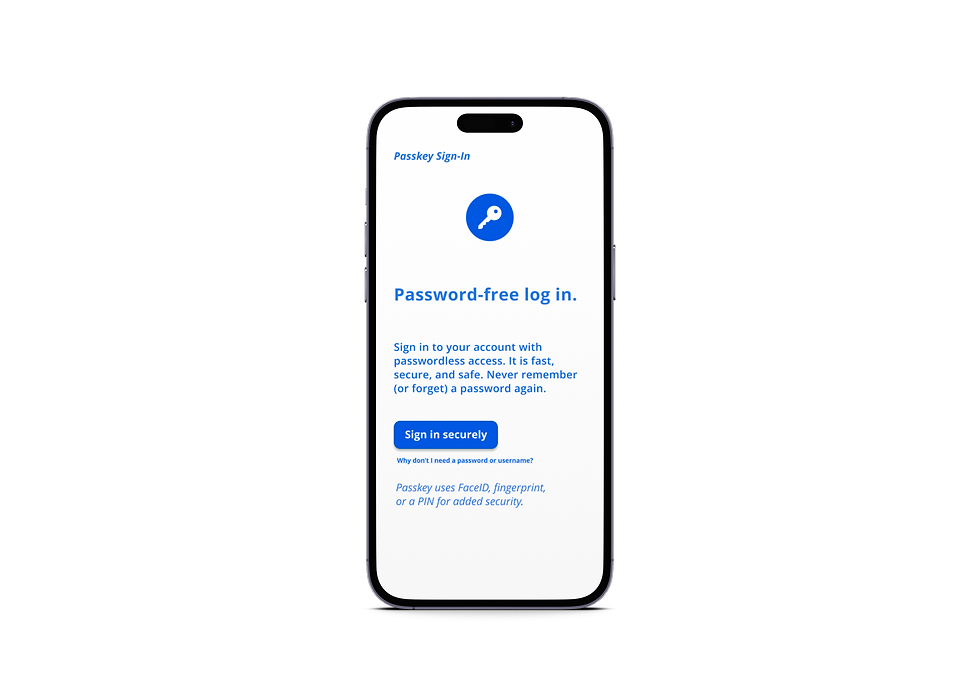
Password-free login. Finally.
Access your account with passwordless sign in. It is fast, secure, and safe. Never remember (or forget) a password again with a mobile passkey.
Sign in securely
Option 2
Passwordless login with passkey.
Sign in for password-free access. It is faster, safer, and more secure. Never remember (or forget) a password again.
Sign in
Conclusion
A user-centric approach can convert users to passwordless sign-in processes, reduce customer support for forgotten passwords, and save companies and customers endless amounts of time and frustration.
